
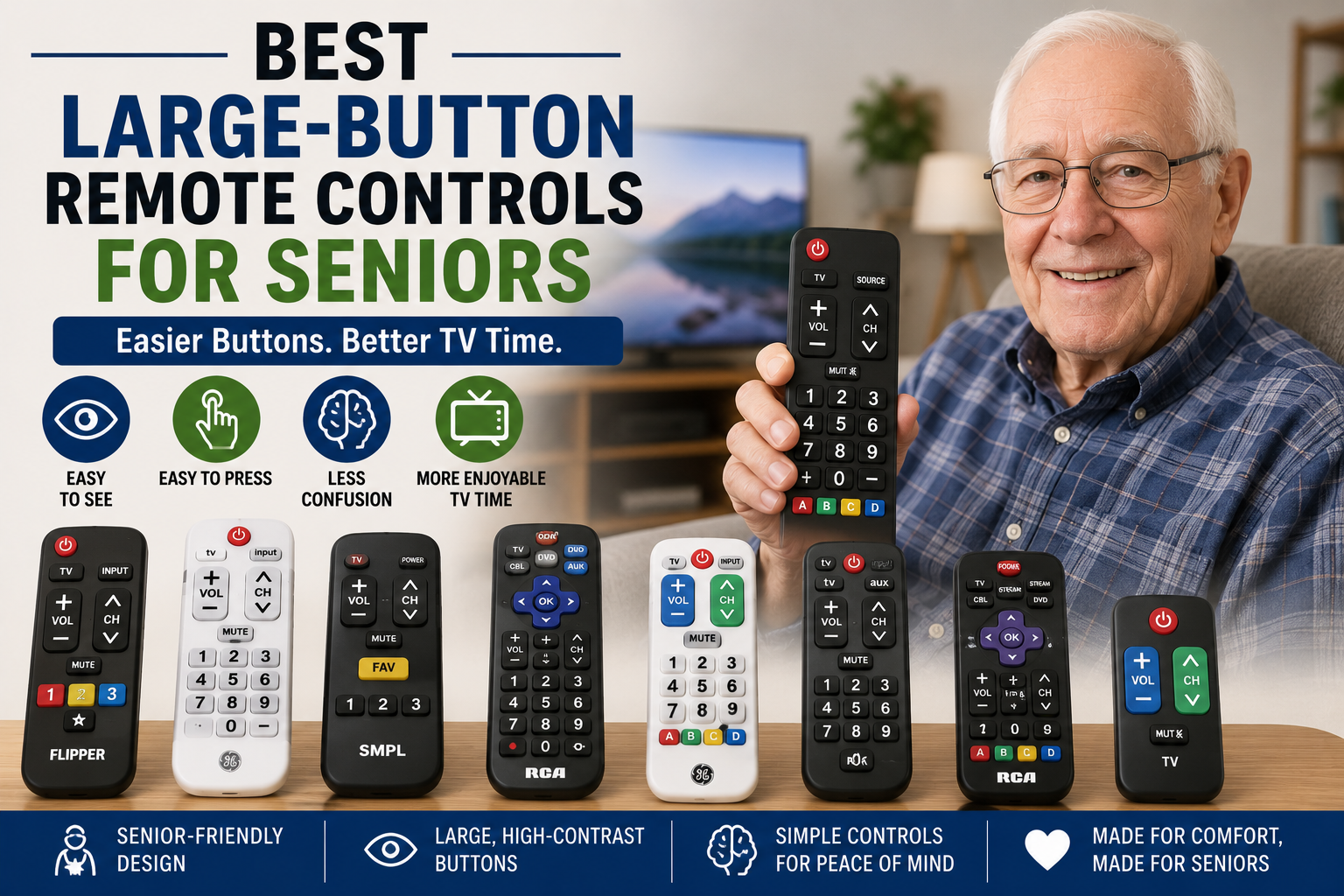
Best Large-Button Remote Controls for Seniors
As an Amazon Associate, I earn from qualifying purchases.
A large-button remote control can make watching TV easier for seniors with poor vision, arthritis, weak hands, memory problems, hand tremors, or trouble using small complicated remotes.
For many older adults, regular TV remotes have too many tiny buttons. It can be hard to find the volume, channel, power, or mute button. Some remotes also have confusing streaming buttons, input buttons, menus, and settings that seniors may never use.
A senior-friendly remote control usually has larger buttons, simple controls, easy-to-read labels, and fewer confusing features. Some are made for basic TV control only, while others can control a TV, cable box, soundbar, or streaming device.
Large-button remotes work well with other senior electronics and home safety products like TV listening devices for seniors, large-button phones for seniors, hearing aids for seniors, smart calendars for seniors, and motion sensor night lights.
Below are some of the best large-button remote controls for seniors.
Quick Picks: Best Large-Button Remote Controls for Seniors
| Product | Best For |
|---|---|
| Flipper Big Button Universal TV Remote | Best overall remote for seniors |
| GE Big Button Universal Remote Control | Best budget-friendly big-button remote |
| EasyMote Universal Big Button Remote | Best backlit remote for assisted living |
| RCA 4-Device Big-Button Universal Remote | Best for controlling multiple devices |
| GE BigEZ OneTouch Big Button Universal TV Remote | Best easy-to-see white remote |
| GE UltraPro 2-Device Big Button Universal Remote | Best simple 2-device remote |
| RCA Universal 4-Device Big Button Remote with Streaming | Best big-button remote with streaming support |
| Big Button TV Remote for Seniors | Best extra-simple remote for basic TV use |
1. Flipper Big Button Universal TV Remote
Best for: Seniors who need the simplest TV remote
The Flipper Big Button Universal TV Remote is one of the most popular senior-friendly remotes because it removes many confusing buttons. It is designed for seniors, elderly adults, and people with dementia who need a simple way to control the TV.
This remote can help with basic TV use such as power, volume, channel changing, and favorite channels. It is designed to reduce accidental button pressing and make TV watching less frustrating.
This can be a very good choice for seniors who get confused by regular remotes with too many buttons.
Why seniors may like it:
- Large easy-to-see buttons
- Simplified design
- Good for seniors with memory concerns
- Can help reduce remote confusion
- Favorite channel support
- Designed for TV and cable-style setups
Important safety note:
Make sure the remote is programmed correctly before giving it to the senior. Test power, volume, channels, and favorite buttons.
Best choice for:
Seniors who need a very simple remote with fewer buttons and less confusion.
2. GE Big Button Universal Remote Control
Best for: Seniors who want an affordable big-button universal remote
The GE Big Button Universal Remote Control is a simple universal remote with large buttons and an easy-to-read layout. It can control up to two devices, such as a TV and cable box, TV and soundbar, or TV and streaming device depending on compatibility.
This is a good budget-friendly choice for seniors who need bigger buttons but do not need a very specialized remote.
The simplified keypad can make it easier for seniors with poor vision, arthritis, or weak hands to use the TV without struggling with tiny buttons.
Why seniors may like it:
- Large simplified keyboard
- Controls up to 2 devices
- Budget-friendly option
- Easy-to-read buttons
- Helpful for poor vision
- Good for simple entertainment setups
Important safety note:
Universal remotes may require setup codes. Keep the instructions nearby in case the remote needs to be reprogrammed.
Best choice for:
Seniors who want a low-cost large-button remote for basic TV control.
3. EasyMote Universal Big Button Remote
Best for: Seniors who want a backlit remote for easier use in assisted living or at home
The EasyMote Universal Big Button Remote is designed for seniors, elderly adults, assisted living, and people who need a simpler TV remote with large buttons.
This remote has a simple layout and backlit buttons, which can make it easier to see in dim rooms. It is designed to work as a learning remote for television and cable box control, which may help replace a confusing original remote.
This can be a good choice for seniors who need large buttons but still want a remote that feels simple and familiar.
Why seniors may like it:
- Large easy-to-read buttons
- Backlit button design
- Good for assisted living or home use
- Simple learning remote style
- Helpful for poor vision
- Useful for TV and cable box control
Important safety note:
Learning remotes may need the original remote for setup. Have a family member or caregiver program it before daily use.
Best choice for:
Seniors who want a simple backlit remote that is easier to see and easier to use.
4. RCA 4-Device Big-Button Universal Remote
Best for: Seniors who need one remote for several devices
The RCA 4-Device Big-Button Universal Remote can control up to four devices, including a TV, cable box, satellite receiver, DVD player, VCR, DVR, or other compatible device.
This is a good option for seniors who have more than one device connected to the TV but still need larger buttons and easier navigation.
It may be more complicated than a very simple senior remote, but it can replace multiple remotes in some living rooms.
Why seniors may like it:
- Controls up to 4 devices
- Large buttons for easier navigation
- Can replace multiple remotes
- Works with many TV setups
- Good for cable, satellite, DVD, and TV use
- Useful for more complete entertainment systems
Important safety note:
A multi-device remote can still be confusing for some seniors. Label the most important buttons if needed.
Best choice for:
Seniors who need larger buttons but still want to control several devices.
5. GE BigEZ OneTouch Big Button Universal TV Remote
Best for: Seniors who want a bright, easy-to-see remote
The GE BigEZ OneTouch Big Button Universal TV Remote is designed with large buttons and a bright white body that may be easier to find than a small black remote.
This remote is designed as a replacement remote for major TV brands such as Samsung, LG, Vizio, Sony, and Roku TV. It also has fully backlit buttons and color-coded controls, which can help seniors with low vision.
This can be a strong choice for seniors who misplace dark remotes or have trouble seeing buttons in dim lighting.
Why seniors may like it:
- Large white remote is easier to find
- Big backlit buttons
- Color-coded volume and channel buttons
- Designed for major TV brands
- Good for low vision
- Simple one-touch style use
Important safety note:
Backlit buttons help in dim rooms, but seniors should still have safe lighting near the TV area to avoid falls.
Best choice for:
Seniors who want a remote that is easier to see, easier to find, and easier to use.
6. GE UltraPro 2-Device Big Button Universal Remote
Best for: Seniors with a simple TV and soundbar setup
The GE UltraPro 2-Device Big Button Universal Remote is designed for small entertainment setups and smart TVs. It can control up to two devices, such as a TV and soundbar, cable box, satellite receiver, or streaming device depending on compatibility.
This is a practical choice for seniors who need something simpler than a 4-device remote but more flexible than a TV-only remote.
The large, simplified keypad may be easier for seniors with poor vision, arthritis, or shaky hands.
Why seniors may like it:
- Controls up to 2 devices
- Large simplified buttons
- Good for TV and soundbar setups
- Helpful for smart TVs
- Easy-to-read layout
- Less complicated than many universal remotes
Important safety note:
If the senior only uses one TV, hide or avoid extra device buttons if they cause confusion.
Best choice for:
Seniors who need a simple remote for a TV plus one extra device.
7. RCA Universal 4-Device Big Button Remote with Streaming
Best for: Seniors who use TV plus streaming devices
The RCA Universal 4-Device Big Button Remote with Streaming is made to control multiple devices and includes support for some streaming setups. This can be helpful for seniors who use a TV, cable box, soundbar, DVD player, or streaming device.
It is not as simple as a basic senior remote, but it may be useful when the senior’s TV setup has several parts.
This is a better choice for seniors who are still comfortable with universal remotes but need larger buttons.
Why seniors may like it:
- Controls up to 4 devices
- Large button layout
- Streaming device support
- Good for TV, cable, soundbar, and more
- Can reduce remote clutter
- Useful for more advanced setups
Important safety note:
If streaming buttons confuse the senior, choose a simpler remote with fewer features.
Best choice for:
Seniors who need bigger buttons but still use several TV-connected devices.
8. Big Button TV Remote for Seniors
Best for: Seniors who only need power, volume, channel, and mute
This Big Button TV Remote for Seniors is designed with very basic controls. It focuses on the main buttons many seniors actually use: power, volume up and down, channel up and down, and mute.
This can be a good option for seniors with dementia, Alzheimer’s, low vision, or confusion from regular remotes.
A remote with fewer buttons can reduce accidental menu changes, input switching, and setup problems.
Why seniors may like it:
- Very simple button layout
- Large color-coded buttons
- Focuses on basic TV functions
- Good for dementia or memory concerns
- Helpful for low vision
- Reduces accidental button pressing
Important safety note:
Make sure this remote works with the senior’s specific TV before relying on it daily.
Best choice for:
Seniors who need the simplest possible remote for basic TV watching.
Why Large-Button Remotes Are Helpful for Seniors
Large-button remote controls can help seniors enjoy TV with less frustration. They make the most important buttons easier to see, press, and understand.
A large-button remote may help seniors with:
- Poor vision
- Arthritis
- Weak hands
- Hand tremors
- Memory concerns
- Dementia
- Low dexterity
- Confusion with regular remotes
- Trouble using streaming remotes
For seniors who also have trouble hearing the TV, see our guide to TV listening devices for seniors.
Simple Remote vs Universal Remote
There are two main types of senior-friendly remotes.
Simple remote:
Best for seniors who only need basic TV control. These remotes usually have fewer buttons and are easier to understand.
Universal remote:
Best for seniors who need to control more than one device, such as a TV, cable box, soundbar, DVD player, or streaming device.
If the senior gets confused easily, choose the simplest remote possible. If the home has several devices, a universal remote may be needed.
How to Choose the Best Large-Button Remote for Seniors
1. Count how many devices need control
If the senior only uses a TV, choose a very simple remote. If they also use cable, satellite, a soundbar, or streaming device, choose a universal remote that can control multiple devices.
2. Look for big, high-contrast buttons
Large buttons with clear labels are easier to see and press. White remotes or backlit buttons may also be easier to find.
3. Avoid too many extra buttons
Extra buttons can confuse seniors. Avoid remotes with lots of tiny menu buttons if the senior only watches basic TV.
4. Consider favorite channel buttons
Favorite channel buttons can help seniors go straight to the channels they watch most.
5. Check compatibility
Universal remotes do not work with every TV or every device. Check the product details and make sure it supports the senior’s TV brand and setup.
6. Think about dementia or memory concerns
For seniors with dementia, fewer buttons are usually better. A remote with power, volume, channel, and mute may be enough.
7. Label the remote if needed
Caregivers can add simple labels like “TV ON,” “LOUDER,” “QUIETER,” or “CHANNEL” if the senior needs extra help.
Large-Button Remote Safety and Setup Tips
- Program the remote before giving it to the senior.
- Test power, volume, channel, and mute buttons.
- Remove old confusing remotes if possible.
- Keep the remote in the same place every day.
- Use bright tape or a remote holder if it gets lost often.
- Choose a white or bright remote if poor vision is a concern.
- Use motion sensor lighting near the TV area.
- Write simple instructions in large print.
- Replace batteries before they fully die.
- Choose fewer buttons if confusion is a problem.
For safer lighting near the living room or bedroom, see our guide to motion sensor night lights for seniors.
Best Living Room Setup for Seniors
A senior-friendly TV setup may include:
- Large-button remote control
- TV listening headphones
- Large-button phone nearby
- Motion sensor night light
- Side table for remote and glasses
- Comfortable chair or lift chair
- Easy-to-read TV guide or channel list
- Good lighting near the chair
- Clear walking path
- Remote holder or basket
For easier TV listening, read our guide to best TV listening devices for seniors.
Frequently Asked Questions
What is the best large-button remote for seniors?
The best large-button remote for seniors depends on the TV setup. A very simple remote is best for seniors with memory concerns. A universal remote is better if the senior needs to control a TV, cable box, soundbar, or streaming device.
Are big-button remotes good for elderly adults?
Yes. Big-button remotes can help elderly adults see buttons better, press controls more easily, and avoid confusion from complicated remotes.
What is the simplest TV remote for seniors?
The simplest TV remote usually has only power, volume, channel, and mute buttons. This is often best for seniors with dementia or memory problems.
Do universal remotes work with all TVs?
No. Universal remotes work with many TVs, but not all. Always check compatibility with the TV brand and devices before buying.
Can a large-button remote control a cable box?
Some large-button universal remotes can control cable boxes, but others only control the TV. Check the product details before buying.
Are backlit remote buttons helpful for seniors?
Yes. Backlit buttons can help seniors see the remote in dim rooms. Good room lighting is still important for fall safety.
Can a large-button remote help someone with dementia?
It may help if the remote has very few buttons. Too many buttons can still cause confusion, even if they are large.
Should I remove the old remote?
Yes, if the old remote causes confusion. Keep only the remote the senior is supposed to use, unless another remote is needed by a caregiver.
What else helps seniors watch TV more easily?
Helpful items include large-button remotes, TV listening devices, large-button phones, motion sensor lights, comfortable seating, and a simple channel list.
Where should the remote be kept?
Keep the remote in the same place every day, such as a side table, remote holder, basket, or chair pocket.
Final Thoughts
A large-button remote control can make TV watching easier and less frustrating for seniors with poor vision, arthritis, tremors, memory concerns, or trouble using regular remotes.
For seniors who only need basic TV use, choose a very simple remote with fewer buttons. For seniors with a TV, cable box, soundbar, or streaming device, choose a universal remote that can control the right devices.
Before buying, check compatibility, button size, number of buttons, backlighting, favorite channel features, and whether the remote is simple enough for the senior to use every day.
The right large-button remote can help seniors enjoy their favorite shows with more confidence, less confusion, and more independence.
Product Links
| Product | Link |
|---|---|
| Flipper Big Button Universal TV Remote | CHECK PRICE ON AMAZON |
| GE Big Button Universal Remote Control | CHECK PRICE ON AMAZON |
| EasyMote Universal Big Button Remote | CHECK PRICE ON AMAZON |
| RCA 4-Device Big-Button Universal Remote | CHECK PRICE ON AMAZON |
| GE BigEZ OneTouch Big Button Universal TV Remote | CHECK PRICE ON AMAZON |
| GE UltraPro 2-Device Big Button Universal Remote | CHECK PRICE ON AMAZON |
| RCA Universal 4-Device Big Button Remote with Streaming | CHECK PRICE ON AMAZON |
| Big Button TV Remote for Seniors | CHECK PRICE ON AMAZON |